Case study · Live in production

Plantation Depot Management System

A complete, custom-built business system for a working eucalyptus timber depot — from the truck arriving at the gate to the payslip at month-end.

Windows desktop, an Android tablet and a live cloud API, built from scratch with no off-the-shelf platform underneath. A ticket captured at the gate is on the office screen before the truck has pulled away — and it runs live, in production, with real money moving through it.

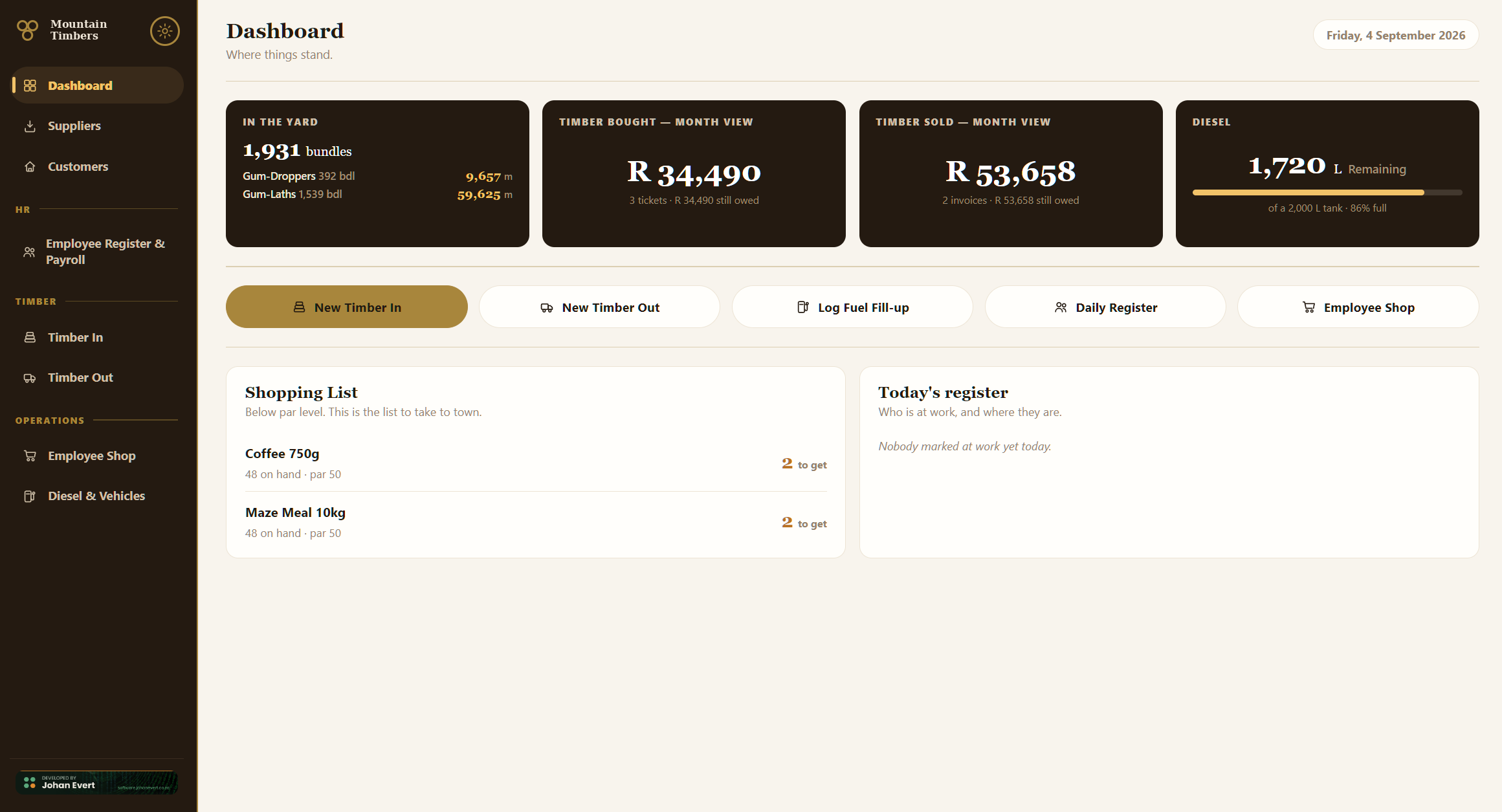
The desktop dashboard: live yard stock, month-to-date timber bought and sold, the diesel gauge, quick actions and the shopping list.
The desktop dashboard — yard stock, the month's timber bought and sold, diesel, quick actions. A working eucalyptus timber depot; trading name, logo and figures genericized for this case study.

The idea

Timber depots run on paper.

A truck arrives, someone counts bundles onto a ticket book, the ticket goes in a drawer, and at month-end somebody sits with a calculator working out what each supplier is owed — at rates that differ per supplier, per product and per length. The same timber sells on at the other end of the yard, at a different set of rates per customer. In between sit wages calculated off an attendance book, an informal shop staff buy from against their pay, and a diesel tank nobody is quite sure the level of.

Generic accounting software doesn't fit this. It has no concept of a bundle of ten droppers, of poles priced by diameter class through a volume conversion table, of pay calculated on accepted quantity rather than delivered, or of a load rejected in part at the gate. The business either bends itself to the software's shape, or stays on paper.

This system was built the other way around: the software was written to the depot's actual workflow, rule by rule, with the owner in the loop for every decision. Where an industry practice existed it was researched and encoded — eucalyptus pole volume factors, bundle conventions. Where the business had its own way of doing something, that way was implemented rather than argued with. The result is a system with no unused fields and no workarounds — every screen is something the business does daily.

Two applications, one live system

Both talk to the same cloud API — a ticket at the gate is on the office screen before the truck pulls away.

DESKTOP · OFFICE

The business-wide view

A landscape application with a full navigation rail: Dashboard, Office Admin — monthly Customer Invoices and Supplier Tickets ledgers — Operations — Employee Register & Payroll, Timber In, Timber Out, Employee Shop, Diesel & Vehicles — and Settings.

Built for the person running the office: month overviews, printable documents, Excel exports, and every rate and setting in the business editable without a developer.
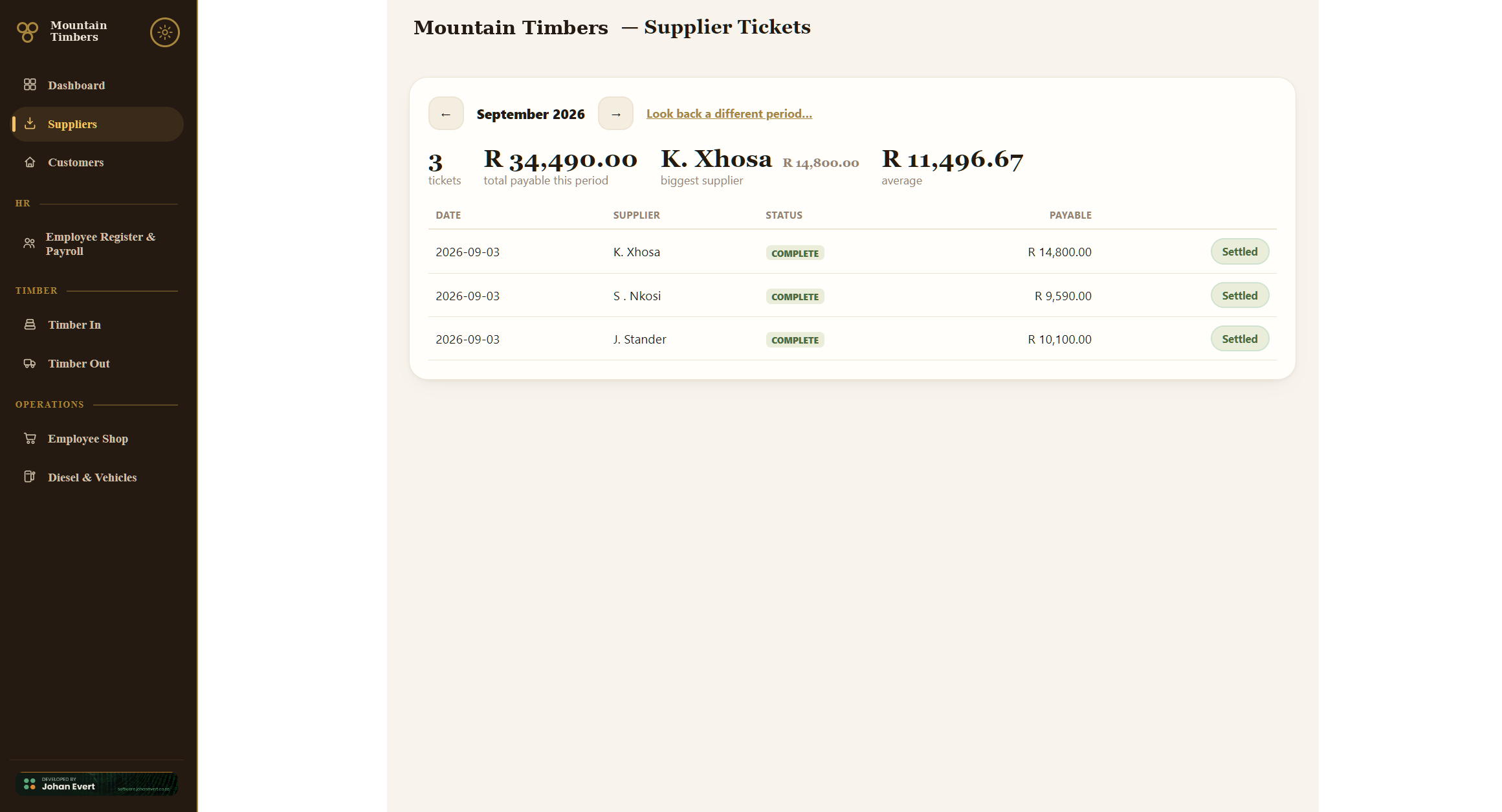
Supplier Tickets ledger: month view, totals, biggest supplier and settle state per ticket.
Supplier Tickets — the month's ledger, with each ticket's settle state
ANDROID · FIELD

Today's work, on a tablet, in the sun

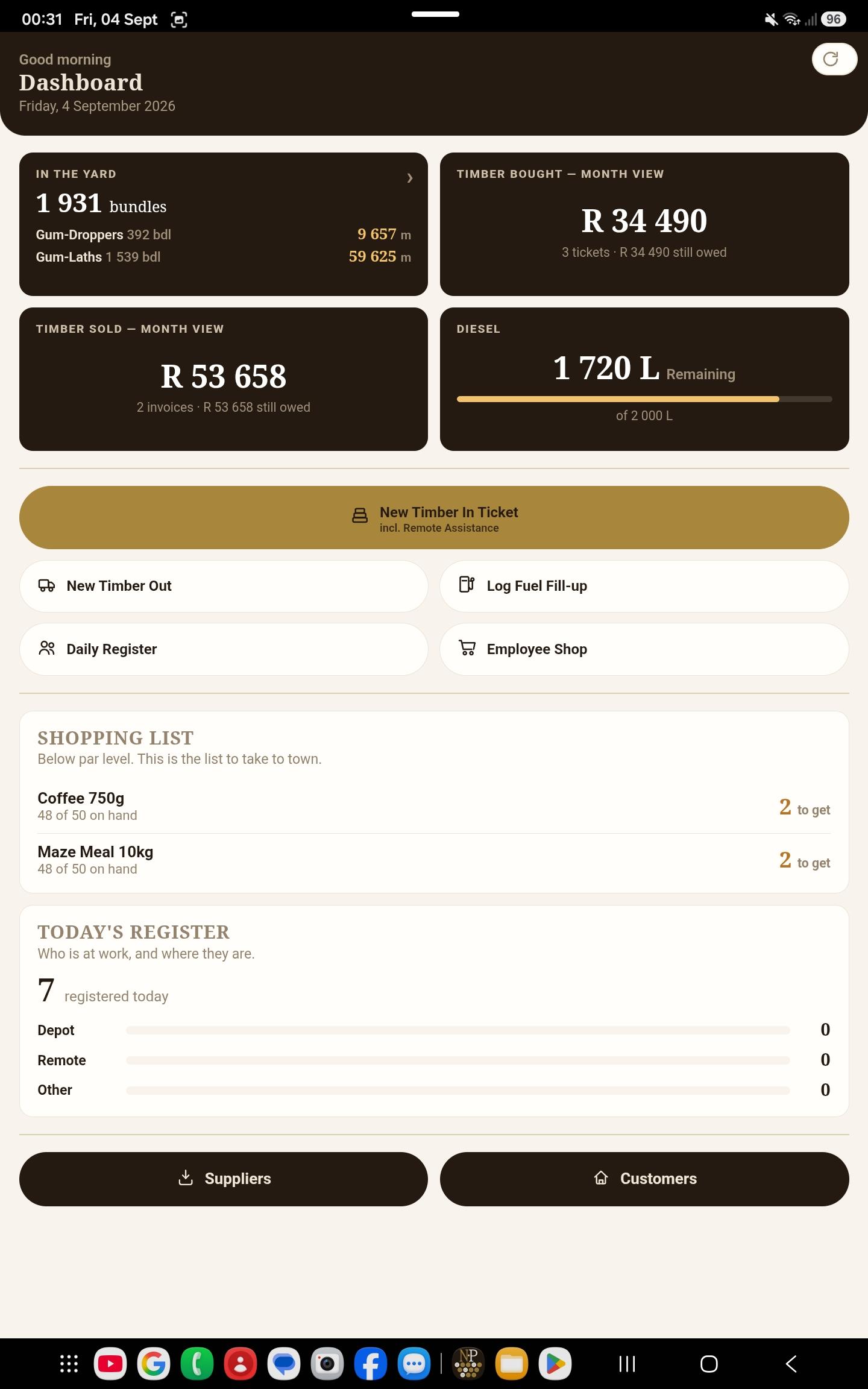
Leads with quick actions — new Timber In ticket, new invoice, fuel fill-up, daily register, shop — plus today's activity and yard stock at a glance. Built for one-thumb capture in portrait, with large tap targets and high-contrast labels chosen for outdoor readability.

No bottom navigation bar — the device's own back button is the navigation, which is what field users reach for anyway.

Android dashboard: yard stock, timber bought and sold this month, the diesel gauge, quick actions, shopping list and today's register.
The tablet dashboard

The modules

Nine modules. No unused fields, no workarounds.

Goods receiving

Timber In

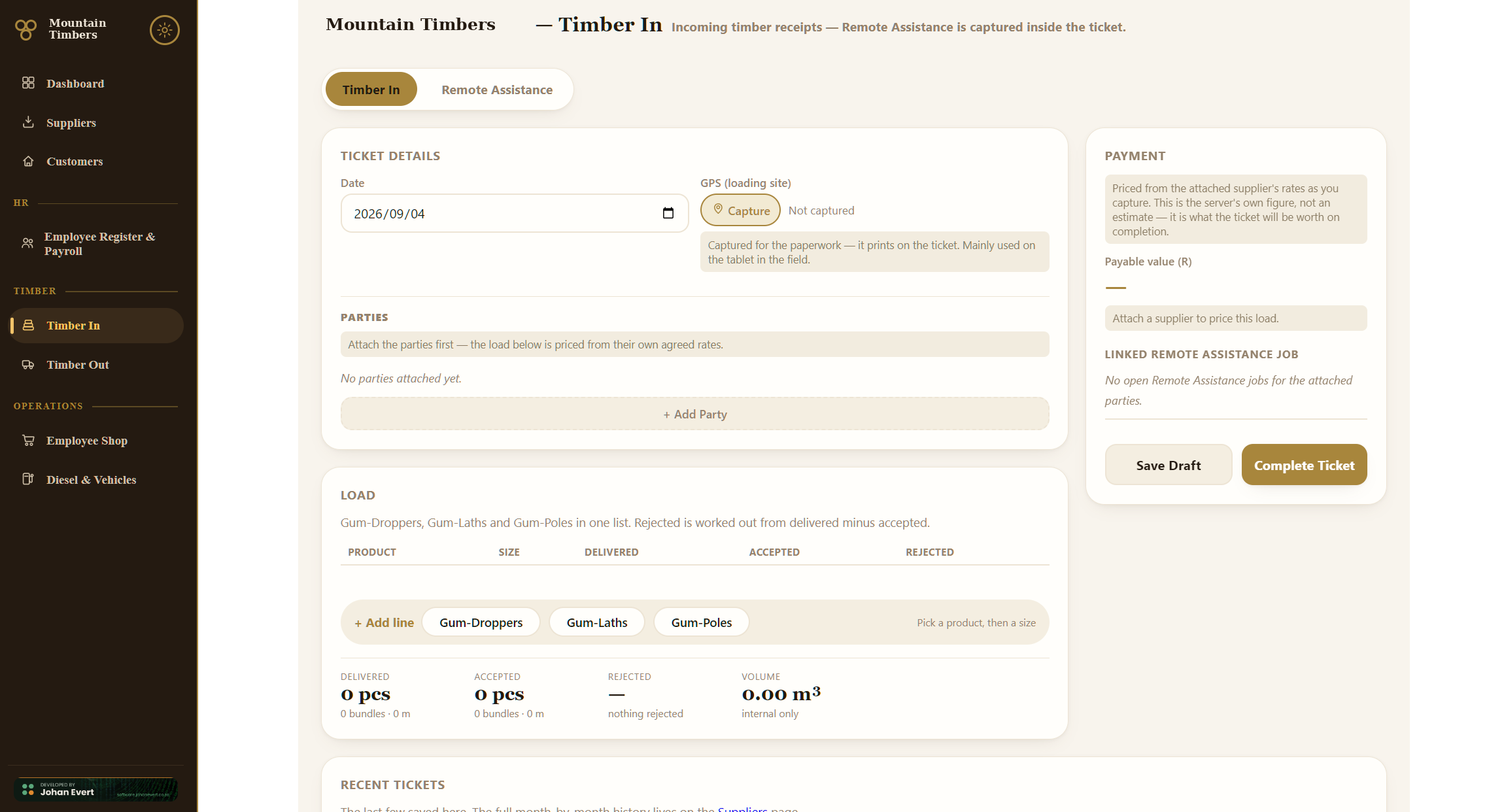
A delivery ticket captures the supplier, transporter and land owner against a load: droppers and laths in bundles by length, poles individually by length and diameter class. The system prices the load automatically from each party's own agreed rates as it's captured — pay calculated on accepted quantity, never delivered — and shows the supplier's and the transporter's payable separately.

Tickets save as drafts in the field and complete later; completing a ticket is the point of no return that feeds yard stock and opens the money owed. GPS of the loading site can be captured and prints on the ticket.

Desktop Timber In screen: ticket details, parties, load lines and a live payable value.
Timber In on the desktop — ticket details, the three parties, load lines, and the supplier's and transporter's payable calculated live as the load is captured

Sales

Timber Out

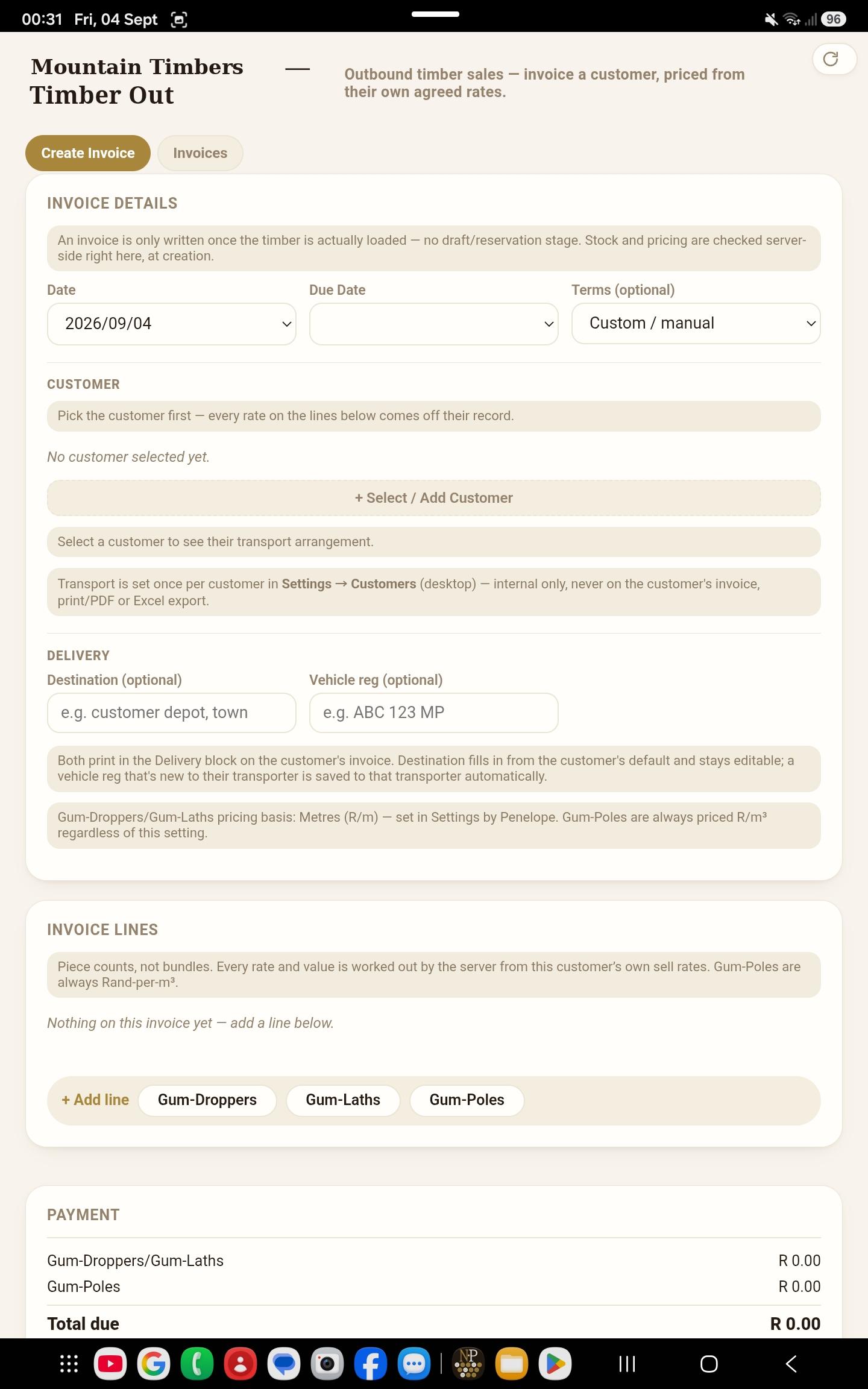
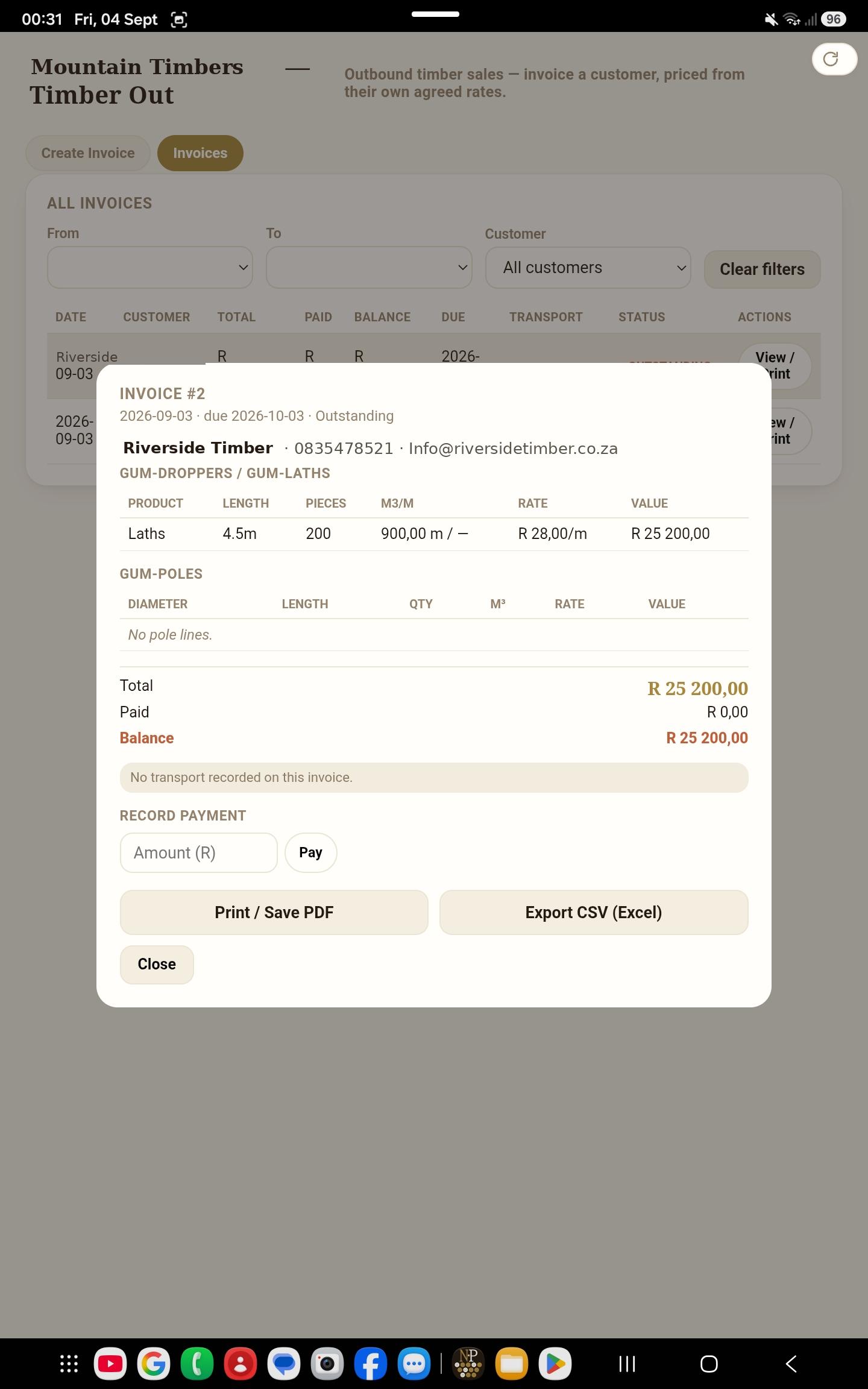
Customer invoices priced from each customer's own sell rates, per metre or per m³ on a global basis toggle — poles always price per m³ via the industry conversion factor table. Stock and pricing are checked server-side at creation, with a deliberate override for overselling — because sometimes the yard genuinely knows better than the book.

Print/PDF and Excel export built in, on a branded letterhead pulled from Settings.

Android Timber Out screen: creating a customer invoice in the field.
Raising an invoice in the field
A printed customer invoice on the tablet, with line detail and a record-payment field.
The finished invoice — line detail, totals, and a record-payment field

Money

Payment tracking

Both sides of the money, deliberately shaped differently because the business treats them differently. Customer invoices take part-payments or a one-tap "paid in full", with a clear-and-re-enter undo. Supplier tickets settle in full monthly, so they're a single "Settled" tap with an undo.

Both dashboards carry a live outstanding figure that survives the month-end rollover — what's owed doesn't stop being owed because the calendar turned.

Inventory

Yard Stock

A live stock position — bundles by product and length, poles as m³ — fed automatically by Timber In and drawn down by Timber Out, with a count-based correction screen in Settings for when the physical count disagrees with the book.

Every correction is written to an audit log with a reason attached.

HR

Employee Register & Payroll

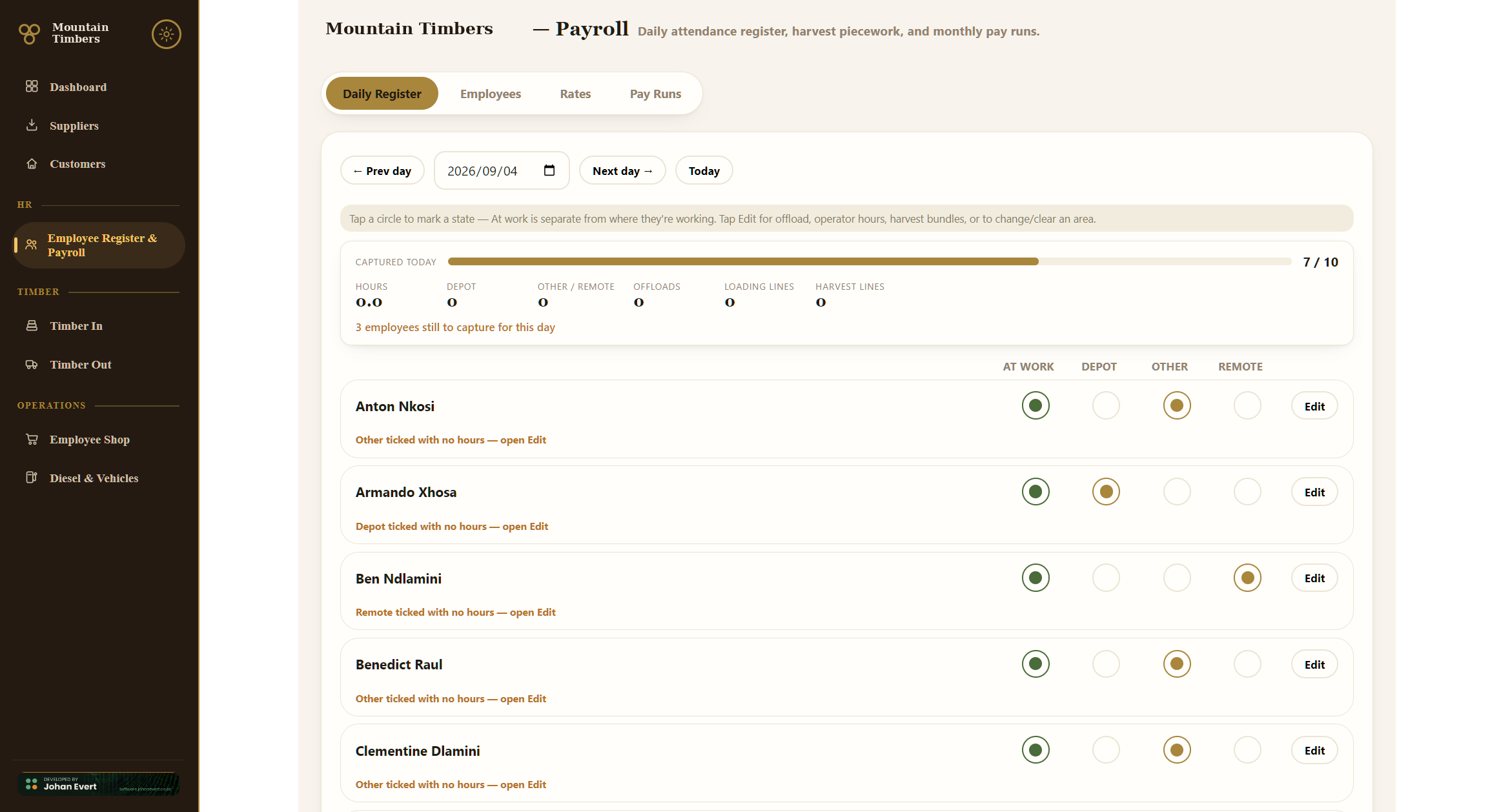
A one-tap daily register — At work, Depot, Other, Remote — with per-day extras: truck offloads, operator hours, truck-loading by product, and harvest piecework by bundle. Pay computes from the register: hourly work at each employee's daily rate ÷ 9, loading at fixed hours per truck type, offloads at a flat rate per occurrence, harvest at per-bundle piece rates, operator hours at their own separate rate.

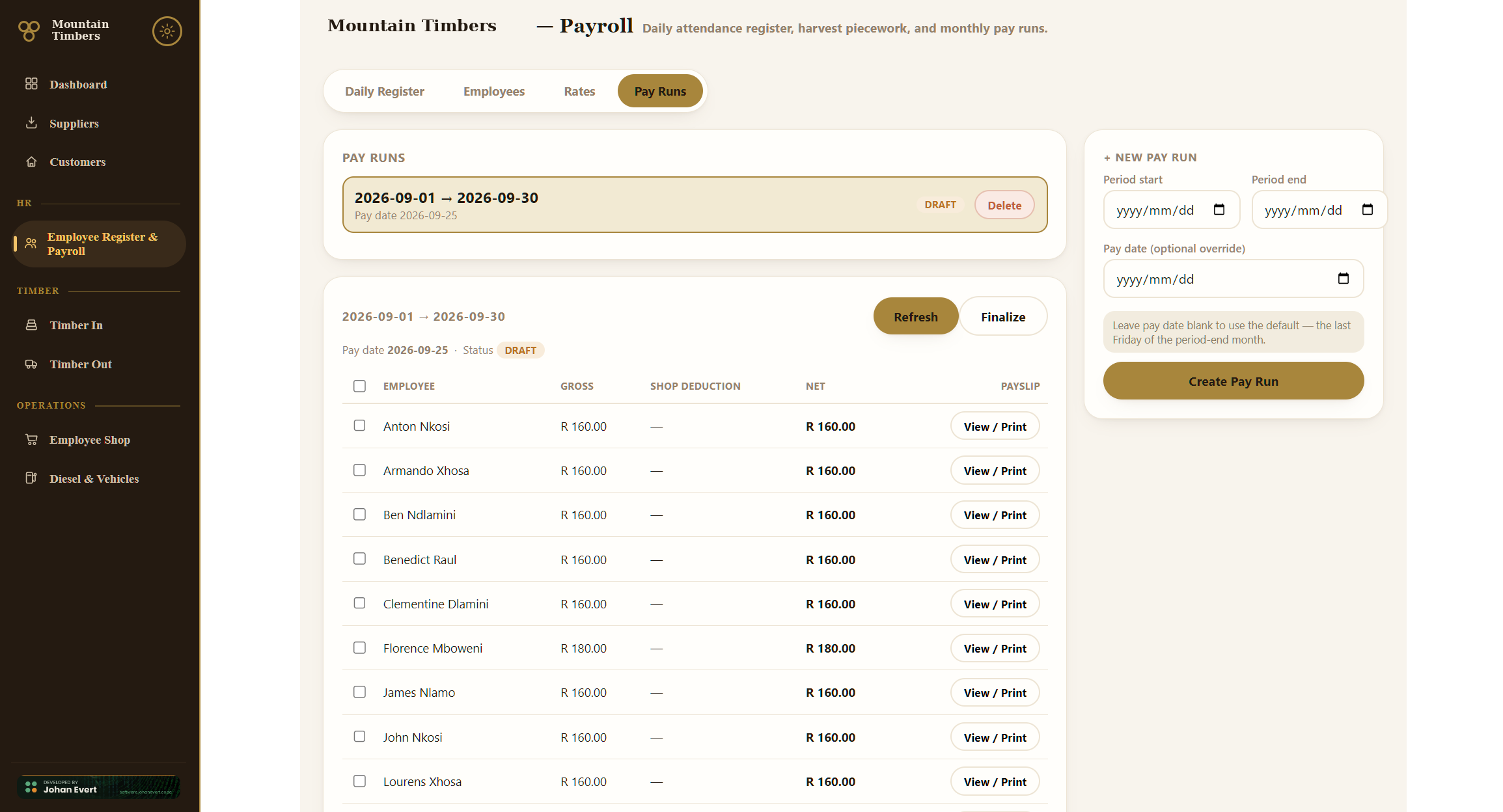
Monthly pay runs are reports rather than transactions — they can be regenerated as often as the office likes and only lock on finalisation. Payslips print individually or in batch, and export to Excel.

Payroll daily register: one-tap attendance capture with a progress bar.
The daily register — one tap per employee, with the day's extras
Payroll pay runs: generated payslips with gross, deduction and net.
A monthly pay run — gross, shop deductions and net per employee

Staff welfare

Employee Shop

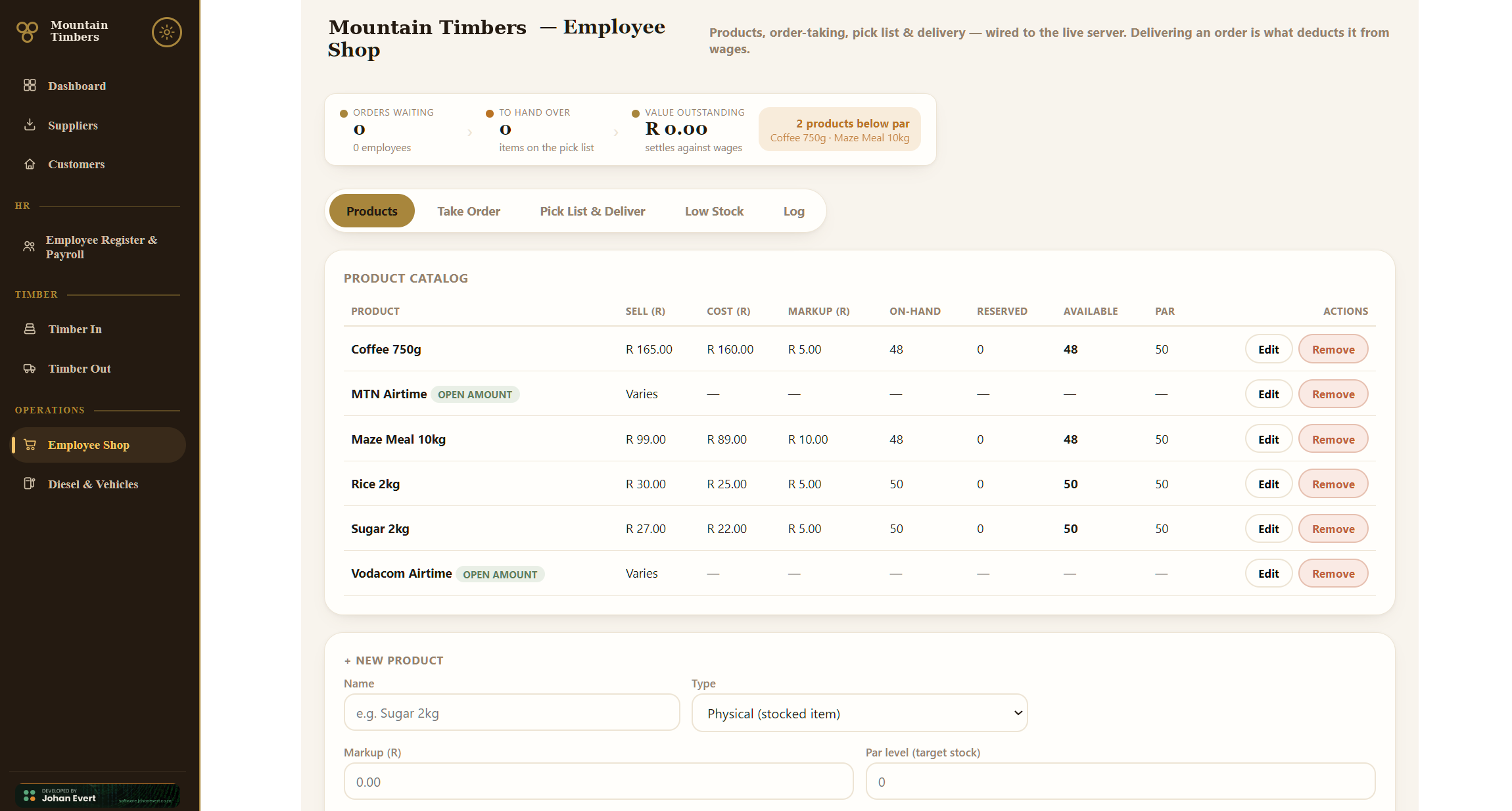
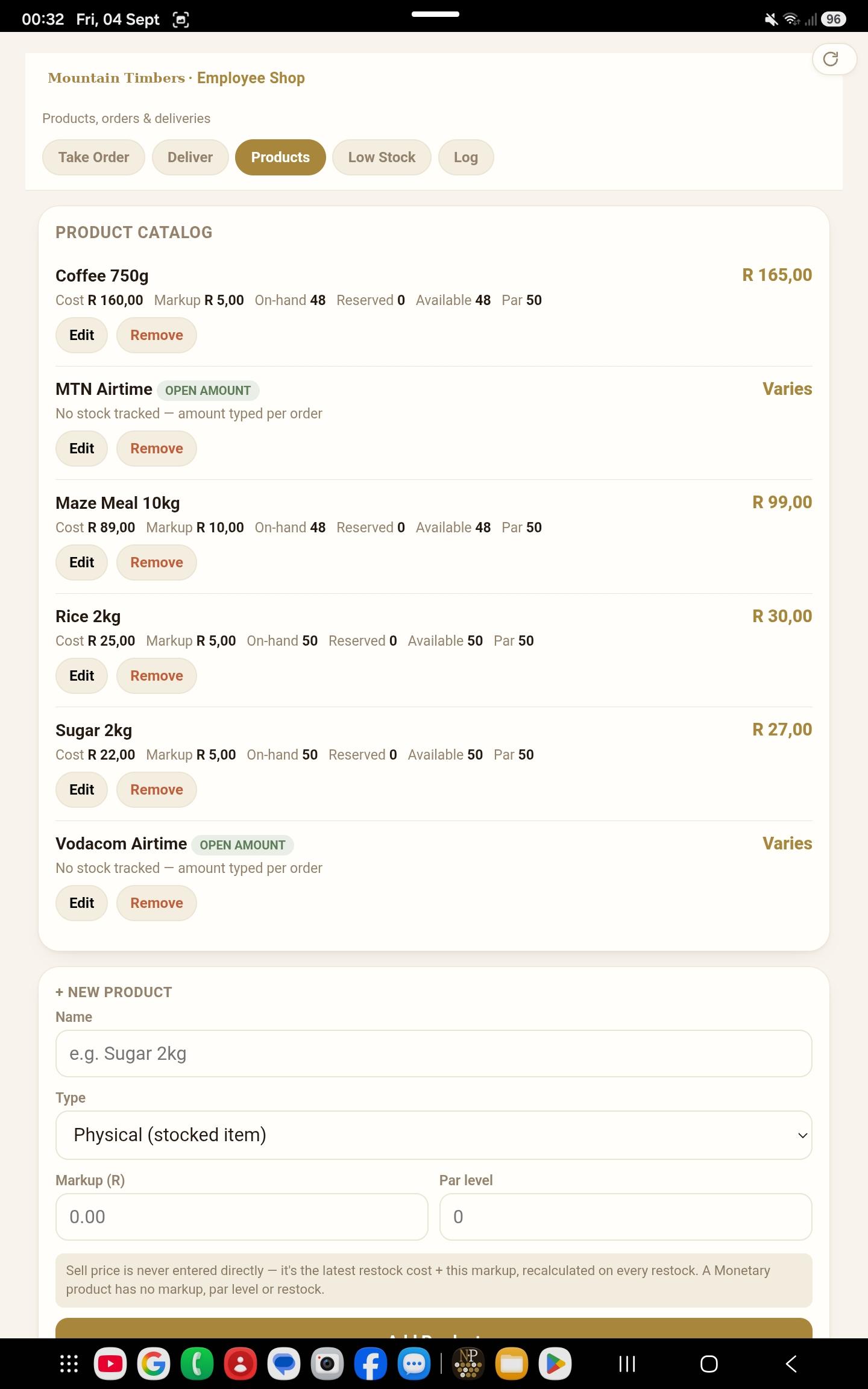
The depot's internal shop, where staff buy against their wages. Products priced as latest cost plus markup — so a restock reprices automatically — orders taken against employees, a consolidated pick list, and a delivery step that is what actually commits the money.

A low-stock shopping list surfaces on both dashboards, and loans are handled as an open-amount product so they settle through payroll like everything else.

Employee Shop product catalog with cost, markup and par levels.
The catalogue in the office — latest cost, markup, par level
Android Employee Shop screen: products, orders and deliveries.
Orders and deliveries on the tablet

Fleet

Diesel & Vehicles

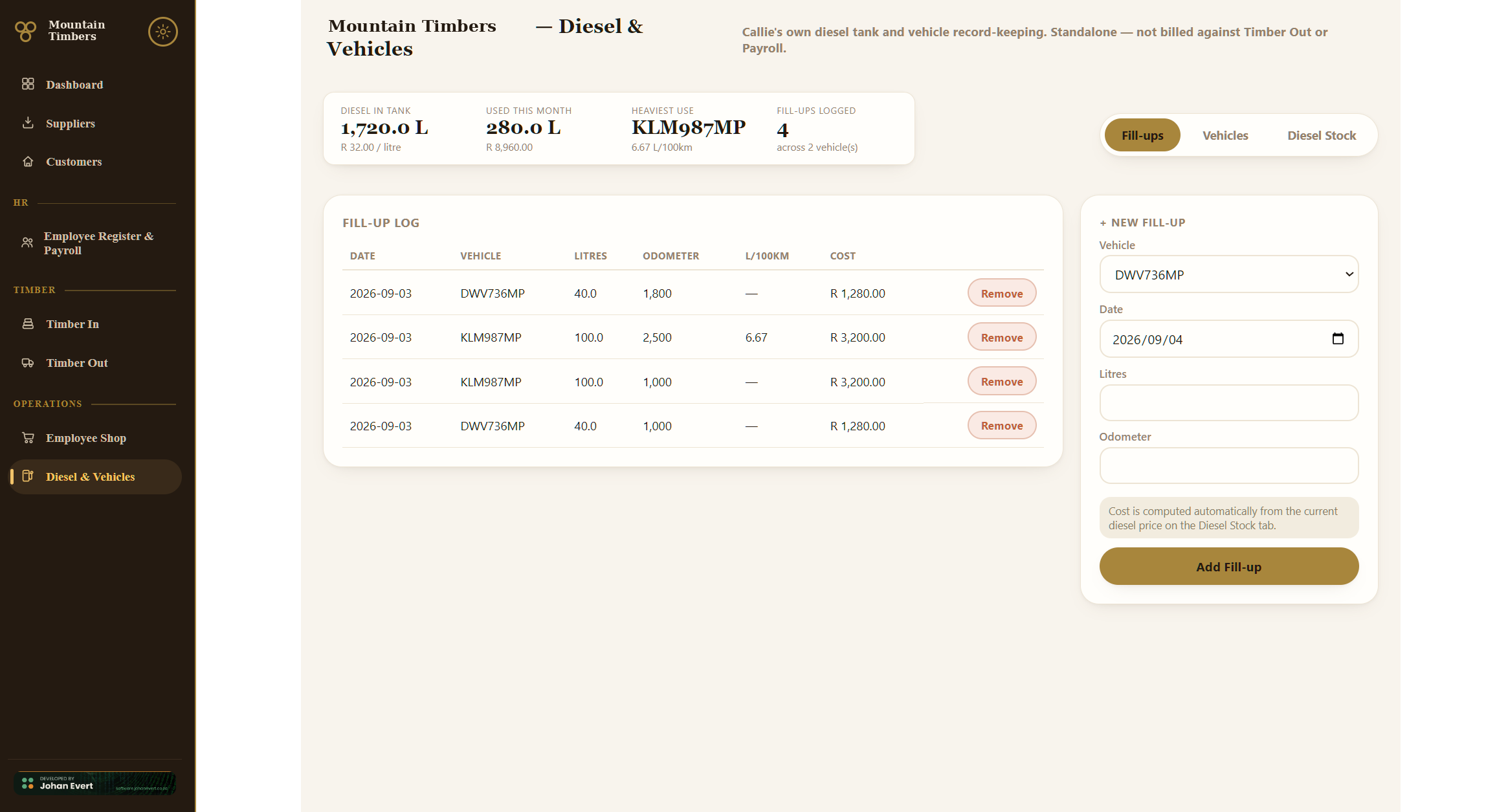
Tank restocks with price per litre, per-vehicle fill-ups costed automatically at the current price, automatic L/100 km consumption tracking per vehicle, and a tank gauge with a configurable low-level warning.

Diesel and Vehicles fill-up log with L/100 km and tank position.
The fill-up log — every litre costed, consumption per vehicle, tank position
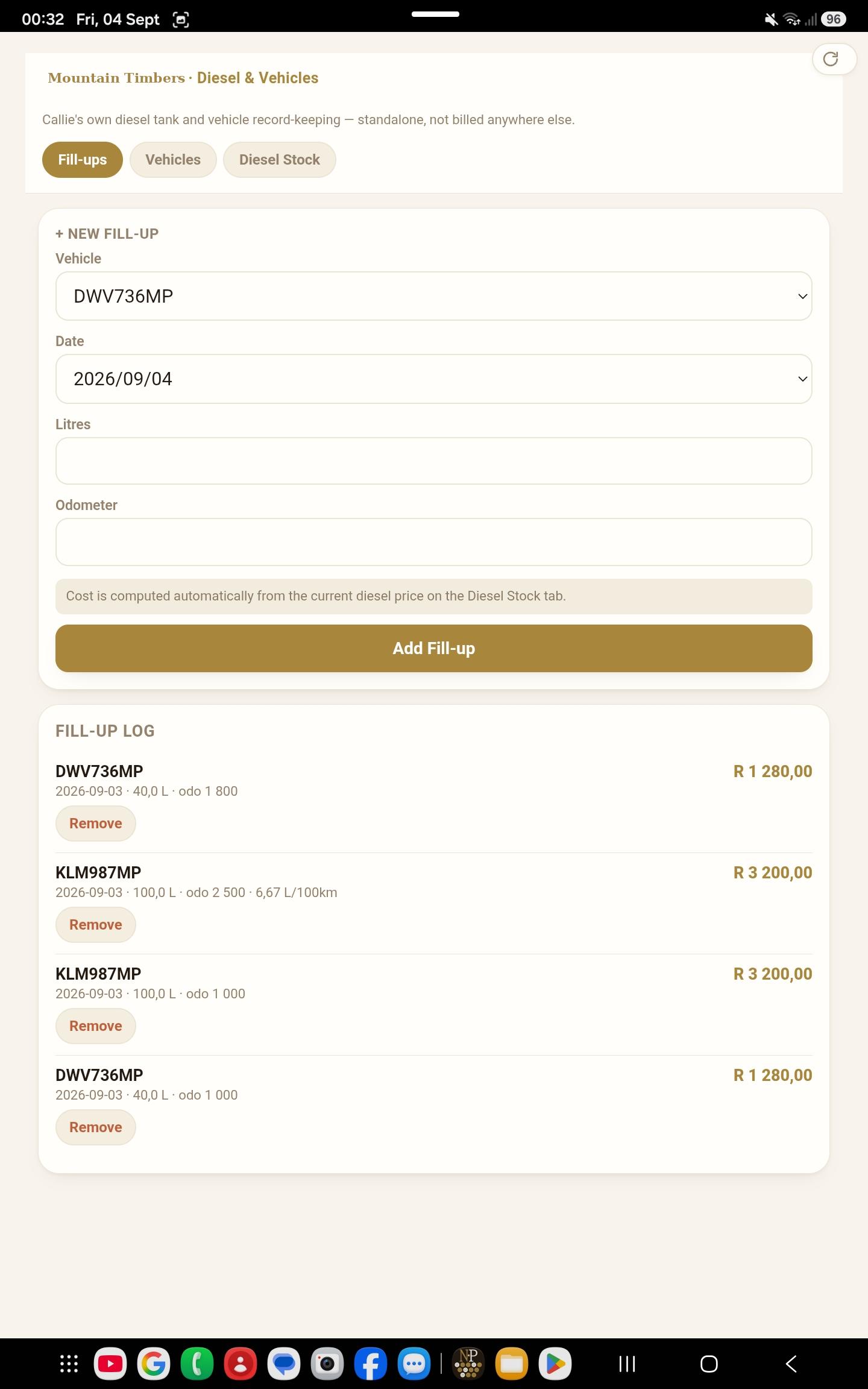
Android diesel screen: logging a fill-up against a vehicle in the field.
Logging a fill-up at the pump

Extra service

Remote Assistance

A specialised service the depot sells, tracked with its own rates and settlement balance and netted off the supplier's payable. Captured inside the Timber In ticket on the tablet, but a separate top-level screen on the desktop — the two platforms deliberately differ, because the field captures it as part of a load while the office reconciles it as its own line of business.

Configuration

Settings

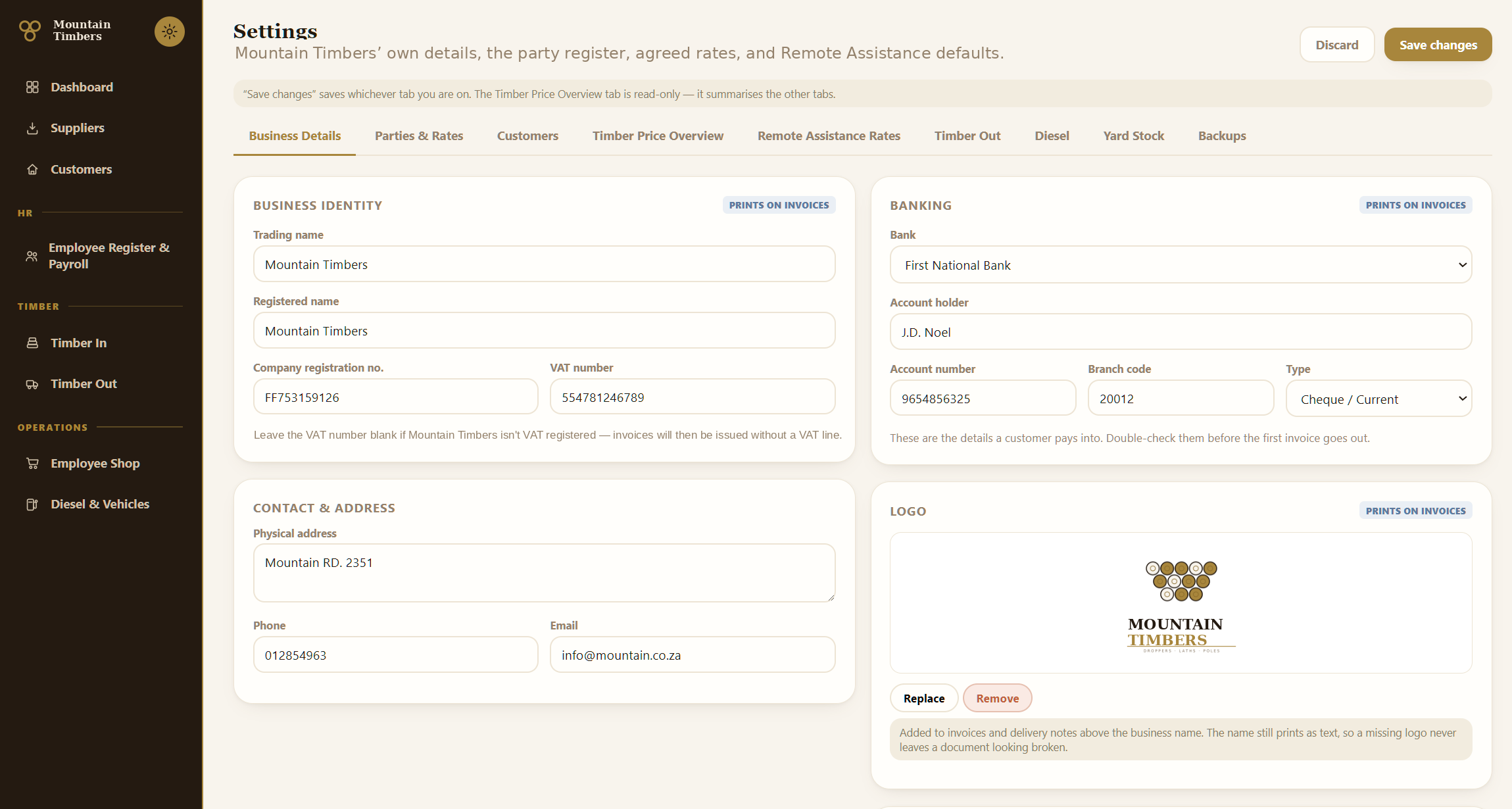
Business identity and banking (both print on invoices), logo upload, the full party register with per-party rates — suppliers, land owners, transporters with their truck lists, contractors, customers — pole conversion factors, Remote Assistance rates, invoicing basis, diesel tank configuration, yard stock corrections and backup downloads.

Archiving rather than deletion wherever a party appears on historical paperwork, so old documents never break.

Settings: business identity, banking and logo, the office's own controls.
Settings — business identity, banking and logo, the party register with rates, conversion factors, and the backup download

Technical detail

What it's actually built from.

  • StackNode.js + Express 4 API over SQLite (better-sqlite3, WAL mode), hosted on a live domain behind HTTPS. Windows desktop packaged with Electron; Android packaged with Capacitor as a sideloaded APK. Three production dependencies on the server — Express, better-sqlite3, CORS — and nothing else.
  • No framework, no build stepThe front end is hand-written HTML, CSS and vanilla JavaScript — roughly 17,500 lines across 18 screens, sharing one stylesheet, one navigation component and one design system. No bundler, no transpiler, no node_modules in the deployed front end. For a system one developer maintains for years and deploys by drag-and-drop over a slow connection, that's a feature rather than a shortcut.
  • Money, calculated onceEvery Rand on every screen — payable value, invoice total, payslip line, shop balance — comes from one set of server-side pricing functions. The clients never compute money they then send back; they ask for it. Pricing refuses to complete a document when a required rate is missing, naming exactly which product and length is unpriced, rather than quietly pricing it at zero.
  • Server, in numbers10 route modules, roughly 3,900 lines, 37 tables. Domain rules live in the routes and are enforced there: completion is idempotent, drafts are the only deletable tickets, a party on live paperwork archives instead of deleting, stock movements are transactional alongside the document that caused them.
  • Custom workflow logicThe parts no off-the-shelf product would give you: bundle-of-ten conventions with per-length metre maths, the eucalyptus pole volume factor table by length and diameter class, accepted-versus-delivered pricing with partial rejection, per-party rate resolution across five party roles, the two-sided settlement model, pay derived from a multi-area attendance day, shop pricing that recalculates from the latest restock, and a Remote Assistance job that nets off against a goods-receipt ticket.

Engineering practice

What keeps a live money system trustworthy.

These parts were built in deliberately rather than bolted on — the difference between software that happens to work today and software that's still trustworthy in three years.

  • Schema migrationsEleven numbered, ordered migration files applied automatically on boot and recorded in the database. Any backup is restorable by copying the file and starting the server — it brings itself current. Applied migrations are never edited; changes are new files.
  • Automated money tests41 tests across three suites — pricing, settlement, stock — each running the real routers over HTTP against a real in-memory database and asserting to the cent. They reproduce actual transactions from the business, so a regression in pricing fails the build rather than surfacing on a supplier's payment.
  • Offline captureThe tablet holds a local write queue and read cache with temporary-ID remapping, so a full day's capture at a depot with no signal syncs cleanly when signal returns. A status pill shows exactly what's waiting; rejected items are kept and flagged, never discarded.
  • Dropped-connection recoveryWhere a save's response is lost mid-flight, the desktop re-reads the true state and shows what actually happened rather than reporting a failure the user has to guess about — including a safe re-check on ticket completion, which the server independently guards against completing twice.
  • Self-updating clientsThe desktop shell loads its screens from the server, so a deployment reaches every office PC on next launch with no reinstall. Tablets check a version endpoint and offer a one-tap install when a new APK is available.
  • Nightly backupsThe database backs itself up daily with two weeks of retained history, and the office can pull an off-site copy from Settings without involving a developer.
  • One design systemA single shared theme — warm, high-contrast, serif-headed — drives all 18 screens on both platforms from one stylesheet, including print stylesheets for invoices, delivery notes and payslips.

Get in touch

Running your business on paper and mental arithmetic?

This is the kind of system I build: module by module, with the business's own rules enforced by the software instead of remembered by a person.